


The State News: South Carolina
3.298.00 Reviews
App Specs
- Version
- 11.1.16
- Updated On
- License
- Free
- Downloads
- 10,000+
- Developer
- McClatchy
- Categories
- News & Magazines
- Platform
- Android
Screenshots

 Analysis by AppCompare
Before choosing a local news app, I’d ask one practical question: do I want a broad national news feed, or do I want a regular connection to what is happening around Columbia? That distinction matters more than a crowded feature list. The State News: Columbia, SC is aimed at readers whose interests are tied to Central South Carolina, so its value depends on whether local coverage is part of your everyday routine.
I would treat it as a focused source rather than a replacement for every news habit. A national outlet is usually a better fit when I want a wide range of international and US stories; a social feed may surface community chatter more quickly, but it can be harder to separate reporting from reaction. This app makes most sense when I want a more direct route to regional news and weather, without expecting it to cover every subject at the same depth.
Who gets the most from a local focus
People who live in the Columbia area, commute through it, study there, or have family and work ties to the region are the clearest audience. A local story can change how I plan the day even when it would barely register in a national feed. If my interest is only occasional, though, a general news app with a local section may be enough; installing a separate app is most worthwhile when I expect to return to it often.
The State is published by McClatchy, and the app sits in the news and magazines category. It is free to install, has an Everyone 10+ age rating, and offers in-app purchases. That combination makes trying it relatively straightforward, but I would still check the purchase details before committing to anything: free download does not necessarily mean every part of a news service is free to use.
Make local coverage useful in a busy day
A realistic way to use it is to check in briefly before leaving home, then return when a local headline affects the route, schedule, or conversation I have planned. I would avoid turning every alert into an interruption. Choosing only the notifications that genuinely help me act is a better routine than enabling everything and eventually muting the app altogether.
For a more deliberate read, I’d save a short window rather than opening stories in every spare minute. A quick scan can tell me what deserves attention; later, I can read the pieces that matter when I have time to follow the details. This is especially useful for local government or community issues, where a headline alone may leave out context. The trade-off is that a focused local app still requires me to use another source when I want a fuller national or international picture.
Read the rating as a caution, not a verdict
The app has an average rating of 3.1 from around 300 ratings, with roughly 100 written reviews, and has been installed over 10,000 times. I see that as a reason to test it against my own habits rather than assume it will suit everyone. Ratings can reflect different expectations, devices, and experiences; the more useful question is whether the coverage and day-to-day reading experience meet my needs.
Worth Reading Before You Choose

Flipboard Shows What News Apps Must Do Beyond the Feed

Switching to Android Auto Means Rethinking Your Driving Routine

Google Calendar Makes a Crowded Week Easier to Manage

Ludo King Makes the Most of the Minutes Between Plans

Baby Panda World Brings Quick Play to Modern Phones, but Its Game Library Feels Busy

ESPN’s Live Game View Makes Following Close Games Easier
It first appeared in 2012, and its current version is 11.1.1. It requires iOS 8.0 or later. Those details help set expectations about compatibility, but I would still check the current store page for my device before installing. The app is not an automatic choice for someone who wants a highly customizable national aggregator, a single source for every region, or no paid content at all. Readers who mainly want Columbia-area reporting have a stronger reason to give it a try.
Where the alternatives have an edge
Compared with national news apps, this one’s appeal is the regional lens, not breadth. A national outlet is more suitable for a reader who wants to follow major events across the country and abroad in one place. A local newspaper’s website viewed in a browser can be a simpler alternative for occasional visits, while community groups and social platforms may help with immediate neighborhood discussion. I would use those as complements, not assume that informal posts offer the same reporting or context as a news source.
There is also a useful distinction between discovering a headline and understanding it. Social feeds can be convenient for finding out that people are talking about an issue, but their stream can move quickly and mix firsthand comments with speculation. A dedicated local news app is a more purposeful place to check for reported coverage. If I need a broad range of viewpoints, I would compare its reporting with other reputable sources rather than treat any one publication as the whole story.
Think through the cost before settling in
The app itself is free, while in-app purchases range from $7.99 to $159.99 per item. That wide span makes it especially important to read the purchase screen carefully and understand what an item provides before paying. I would not assume that every reader needs to buy anything, nor would I plan a budget around the lowest amount without checking the actual offer shown in the app.
Switching from a browser or another news app has a small but real habit cost: I need to remember to check a new place and decide which alerts deserve my attention. I’d give it a short trial as part of an existing routine, such as a morning news check, then judge whether its local coverage earns a regular place there. If I rarely open it, a bookmark to the publication’s site or a broader app may be more convenient. If I find myself using it for Columbia developments that other sources overlook, the extra app can be worthwhile.
First Impressions and User Experience
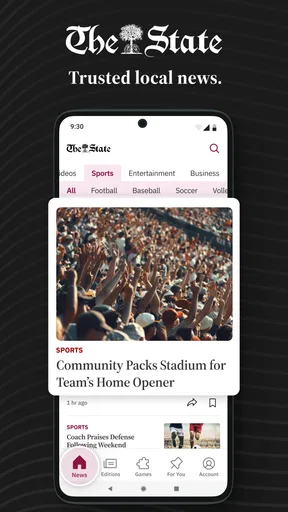
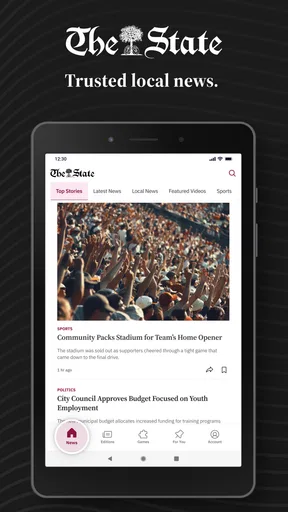
Right off the bat, you’ll notice that the app is pretty sleek. It’s got a clean interface that’s easy to navigate, which is a big win in my book. We all know the pain of trying to find relevant news stories in a clunky app, but The State News avoids this pitfall with flying colors. Everything is laid out intuitively, making it easy to jump into the latest happenings.
After downloading the app, I was greeted with a straightforward setup process. No unnecessary hoops to jump through, just a quick and simple sign-up. I appreciate that it doesn’t bombard you with a million questions right from the get-go. Just download, set up, and you’re ready to dive into the news.
Content Quality and Variety
Now, let’s talk about what really matters: the content. The app covers a broad spectrum of topics, from local politics to sports, and even lifestyle features. This variety keeps things fresh and ensures there’s something for everyone. Whether you’re a politics junkie or just want to catch up on the latest USC Gamecocks game, you’re covered.
The stories are well-written and informative. They do a good job of balancing depth with brevity, ensuring that you get all the details without feeling overwhelmed. I found myself particularly drawn to the investigative pieces, which are both engaging and enlightening. You can tell there’s a lot of effort put into maintaining high journalistic standards.
Personalization Features
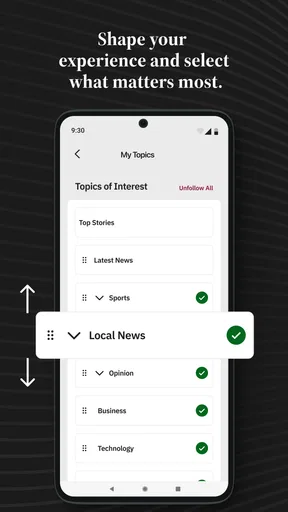
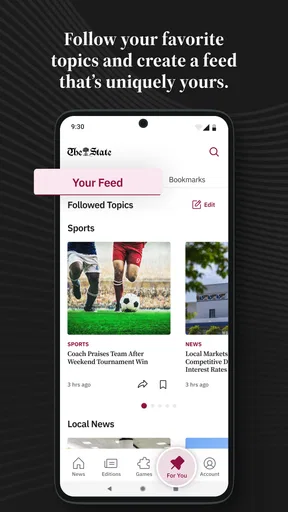
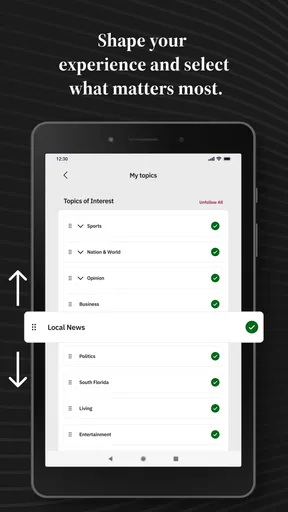
One of the standout features is its personalization options. The app allows you to tailor your news feed to suit your interests. Want more local news and less sports? No problem. Just tweak your settings, and you’re good to go. It’s a small touch, but it makes a huge difference in ensuring you see the news that matters most to you.
Notifications are another area where the app shines. You can customize alerts to keep you updated without bombarding you with every little news blip. It’s like having a personal news assistant who knows exactly what you want to see.
Performance and Usability
The app’s performance is smooth and responsive, which is crucial for keeping users engaged. There’s nothing more frustrating than laggy load times, especially when you’re trying to catch up on breaking news. Thankfully, The State News handles this with ease. Stories load quickly, and transitioning between sections is seamless.
Even on older devices, the app performs well, which speaks volumes about its optimization. It’s clear that the developers have put a lot of thought into ensuring a smooth user experience across the board.
Final Thoughts
So, is The State News: Columbia, SC worth the download? Absolutely. It’s a well-rounded app that brings the local news scene right to your fingertips. With its user-friendly interface, high-quality content, and smart personalization options, it’s a must-have for anyone in the Columbia area who wants to stay informed.
While no app is perfect, this one comes pretty close for its intended purpose. It’s a reliable companion for your daily dose of news, and I find myself checking in more often than I expected. If you’re in South Carolina or just interested in the region, give it a go. You might just find it becomes an essential part of your daily routine.
Pros
- Up-to-date local news coverage.
- User-friendly interface.
- Customizable notifications.
- Multi-platform access.
- Offline reading mode.
Cons
- Limited international news.
- Ads can be intrusive.
- Some features require subscription.
- Occasional loading delays.
- Limited multimedia content.
FAQs for The State News: South Carolina
What platforms is The State News app available on?
The State News app is available for both Android and iOS devices. Users can download it from the Google Play Store for Android or the Apple App Store for iOS. Ensure your device meets the minimum system requirements for a smooth experience.
Does The State News app offer real-time news updates?
Yes, The State News app provides real-time news updates to keep users informed about the latest happenings in Columbia, SC. You can enable notifications to receive breaking news alerts directly on your device as soon as they are published.
Is there a subscription fee for The State News app?
The app itself is free to download, but some content may be behind a subscription paywall. Users can access a limited number of articles monthly for free, but full access requires a subscription. Check the app for current pricing and subscription options.
What types of news does The State News app cover?
The State News app covers a wide range of topics including local Columbia news, politics, sports, entertainment, and community events. It's designed to provide comprehensive coverage tailored to residents and those interested in South Carolina news.
Can I customize the news topics in The State News app?
Yes, the app allows customization of news topics to suit your interests. Users can select preferred categories and set up personalized notifications. This feature helps ensure that you only receive news that matters most to you.


